
Payment Instructions
*IMPORTANT NOTE ON AVOIDING PAYMENT FAILURES AND HOLDS
Please do not enter anything in the payment memo or notes for any payment method. Either leave it blank or, if required, enter only your ORDER #. Banks and payment processors cannot differentiate between research peptides and pharmaceuticals. Including product names (e.g., Tirzeptide, BPC-157) may cause your payment to be flagged, delayed, or blocked.
eCheck (Electronic Check) – Pay from Your Checking Account
To pay by eCheck, all you need is your ROUTING and ACCOUNT NUMBER rom your CHECKING account.
How to find Routing & Account Number with no Paper Check
- Navigate to your Checking Account page.
- Log in to your online banking or mobile banking app.
- Look for a section labeled Account Details, Account Info, or Direct Deposit Info.
- Your routing number and account number will be listed there.
- If not visible, use the bank’s Search feature and type “routing number” or “account number.”
- You can also contact your bank’s customer support and ask for your ACH routing number and checking account number.
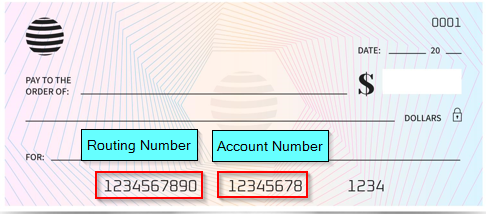
How to find Routing & Account Number on Paper or Voided Check
If you have paper checks, you can locate these at the bottom of the check.
Bank Transfer (ACH)
*Bank Transfers typically take 3 to 7 days to post to our account. Your order will remain on-hold until payment is posted to our account. Our bank details will be provided to you via email.
Option 1: In – Branch
- Visit your bank with a photo ID.
- Tell the teller you want to send a bank transfer.
- Give them the business our business routing number and checking account number (*we will provide this to you)
- Confirm the amount to send.
- The teller will process it and provide a receipt.
Option 2: In – Online Banking App (if supported)
- Log in to your online banking app.
- Go to Pay Bills, Send Money, or Transfers.
- If your bank allows it, select “Send to a Bank Account” or “External Transfer.”
- Enter the business’s routing number, account number, and amount.
- Review and confirm.
Option 3: In – Online Transfer through Wise
- Go to wise.com or open the Wise app.
- Create an account or log in.
- Select Send Money.
- Choose the amount you want to send.
- When asked where to send it, choose Bank Account.
- Enter the business’s routing number, checking account number, and account name exactly as provided.
- Select your payment method (bank debit, card, or other options Wise supports).
- Review the details and confirm the transfer.
Option 4: In – Ask Your Bank for Help
If you can’t find the option online:
- Call your bank’s customer service or visit a branch.
- Ask: “How can I send a transfer to a bank account using the routing and account number?”
- They will tell you whether they can do it for you in-branch or over the phone.
Crypto (Bitcoin)
*NOTE: Many banks have strict regulations and often flag or decline Crypto purchases. Check with your bank if you are unsure.
How to Pay
- Download a recommended app (wallet) and create an account.
- Add a bank debit card or use bank transfer.
- Purchase enough Bitcoin (BTC) to cover your order plus ~5% to account for exchange/app fees and network fees.
- Tap Send, enter the merchant’s wallet address, and confirm. Important: Always verify the address. Payments sent to incorrect addresses cannot be reversed and will not be refunded.
- Save your transaction ID for reference and email to us.
Recommended Wallets:
- Coinbase Wallet
- Trust Wallet
- MetaMask
- Exodus
- Zengo
SEND BITCOIN PAMENT TO:
BTC address: 31oQGzodfhZnxShRgBafFEomT65SQpc4Ub